
Vodafone supplies the Power Hub with Standard Broadband and the Ultra Hub 7 with Pro 3. The Power Hub is a capable Wi-Fi 6 router for everyday part-fibre and full-fibre use. The Ultra Hub 7 adds Wi-Fi 7 hardware and forms part of a wider package with mesh Wi-Fi, mobile backup, enhanced support and network security.
The better choice depends less on the name printed on the router and more on the broadband service, size of the property and Pro 3 features the household will actually use.
Power Hub vs Ultra Hub 7 at a glance
| Feature | Vodafone Power Hub | Vodafone Ultra Hub 7 |
|---|---|---|
| Supplied with | Standard Vodafone Broadband | Vodafone Pro 3 |
| Broadband connection | Part-fibre or full fibre, subject to address | Full fibre |
| Wi-Fi standard | Wi-Fi 6 | Wi-Fi 7 |
| Wireless bands | 2.4GHz and 5GHz | 2.4GHz and 5GHz; no separate 6GHz band |
| Multi-Link Operation | No | Yes, with compatible devices |
| Ethernet | Gigabit Ethernet | Two 2.5Gbps-capable connections and two Gigabit Ethernet ports |
| Maximum Vodafone service | Packages up to 910Mbps | Pro 3 full-fibre services up to 2.2Gbps at selected addresses |
| Mesh Wi-Fi | Optional Super WiFi add-on | One Super WiFi 7 Booster initially included with Pro 3 |
| Whole-home guarantee | Only with the eligible paid Super WiFi service | Included with Pro 3, subject to Vodafone’s terms and support process |
| Mobile backup | Not included | 4G Broadband Back-up included |
| Enhanced support and security | Standard Vodafone support; security services depend on the plan | Broadband Xperts and Secure Net Home included |
| Best suited to | Most homes wanting capable Wi-Fi without the Pro 3 premium | Larger or busier homes that will use the complete Pro 3 service |
The maximum package speed describes the connection reaching the router. A single device may receive less because of its Ethernet or Wi-Fi hardware, signal conditions and network demand.
Pro 2 remains relevant in some part-fibre areas. Eligible new customers may still be offered Pro 2 with the Wi-Fi 6E Ultra Hub where Pro 3 full fibre is unavailable. It is a separate package rather than a third standard-router choice.
Vodafone Power Hub
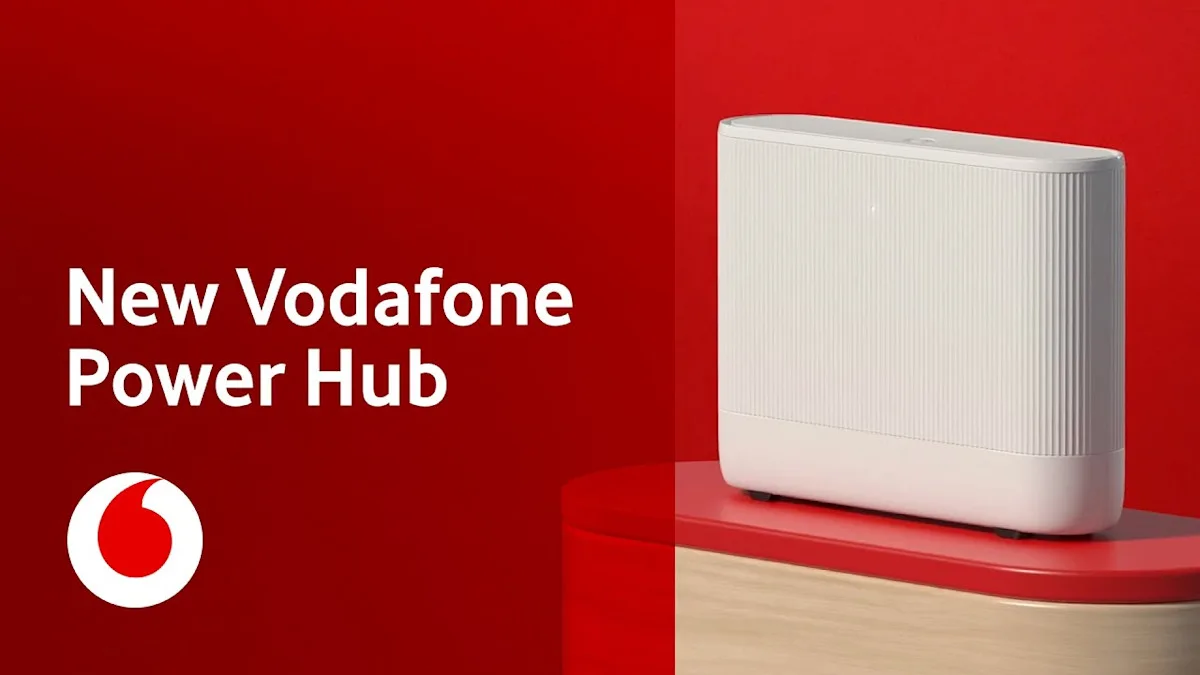
The Power Hub is Vodafone’s mainstream fixed-line router. It works with Standard part-fibre and full-fibre services, including Full Fibre 150, Full Fibre 500 and Full Fibre 910 where available.
Dual-band Wi-Fi 6 is already sufficient for ordinary phones, laptops, televisions, consoles and smart-home products. The router also provides Gigabit Ethernet for devices that benefit from a stable wired connection.
The Power Hub should not be confused with Vodafone’s similarly named 5G Power Hub. The 5G model uses Vodafone’s mobile network and belongs to a different broadband service.
Where the Power Hub works well
- Small and medium-sized homes with sensible router placement.
- Households whose devices mainly use Wi-Fi 5 or Wi-Fi 6.
- Streaming, home working, video calls and online gaming together.
- Wired connections up to Gigabit Ethernet speeds.
- Customers who prefer the lower-cost Standard package.
Power Hub limitations
- No Wi-Fi 7 or Multi-Link Operation.
- No mobile broadband backup with the Standard package.
- Whole-home Wi-Fi support requires an eligible Super WiFi add-on.
- A weak signal still needs better positioning, a booster or a separate mesh system.
- Gigabit Ethernet cannot deliver more than 1Gbps to one wired device.
Vodafone Ultra Hub 7
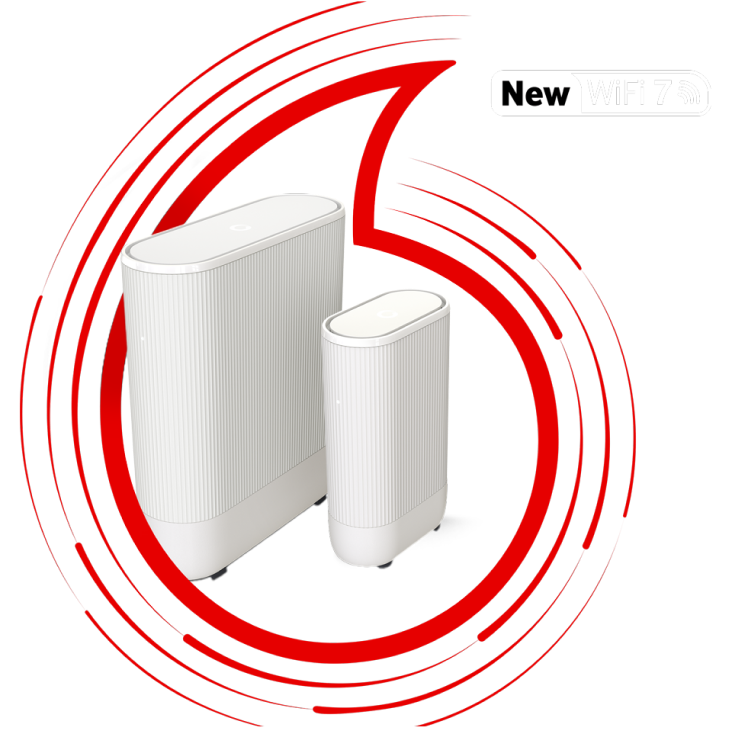
The Ultra Hub 7 is supplied with Vodafone Pro 3 full fibre. Its main hardware advantage is Wi-Fi 7, including Multi-Link Operation and 4096-QAM for compatible devices. It also provides multi-gigabit wired connections for services and equipment that exceed ordinary Gigabit Ethernet.
Vodafone’s implementation is dual-band, using 2.4GHz and 5GHz. It does not have a separate 6GHz radio. That distinction matters because some other Wi-Fi 7 routers use three bands and can offer additional short-range capacity on 6GHz.
Older Wi-Fi devices can still connect. They use the wireless standard available in their own hardware, so changing to the Ultra Hub 7 does not turn a Wi-Fi 5 or Wi-Fi 6 device into a Wi-Fi 7 device.
What Wi-Fi 7 can improve
- More efficient use of the available wireless links.
- Lower latency and steadier performance when compatible devices use MLO.
- Greater short-range throughput for newer phones and computers.
- Better use of a multi-gigabit full-fibre service through compatible wired hardware.
- A Wi-Fi 7 mesh link between the hub and included booster.
Practical limits
- Wi-Fi 7 benefits need Wi-Fi 7 devices; older equipment remains limited by its own hardware.
- No separate 6GHz band means the specification differs from tri-band Wi-Fi 7 systems.
- Walls, floors, distance and interference still reduce wireless speed.
- Speeds above 1Gbps need suitable Ethernet adapters, cables and devices.
- The Ultra Hub 7 is tied to Pro 3 rather than offered as a simple router upgrade.
Super WiFi and Pro 3 features
Pro 3 is more than an Ultra Hub 7 rental. Its value comes from the combination of the router, mesh Wi-Fi, connection backup, support and security. These services are the strongest reason to choose it over Standard Broadband.
Super WiFi 7 Booster
One booster is supplied initially. It creates a mesh with the Ultra Hub 7, using the same network name while helping the signal reach rooms that the hub cannot cover well by itself.
Place it between the hub and the weak area, not inside the room where the signal has already disappeared. Vodafone can provide up to two additional boosters after its checks, making three boosters in total.
Whole-home Wi-Fi guarantee
Vodafone promises at least 10Mbps Wi-Fi in each room under the Pro 3 guarantee. The support process must be completed and all three boosters used before the right to leave can apply.
If Vodafone still cannot provide the guaranteed coverage, the customer must notify it within 30 days of receiving the third booster to end the agreement without an early termination charge.
4G Broadband Back-up
The Ultra Hub 7 can switch to Vodafone’s 4G network during a total fixed-line broadband loss. The included allowance is 100GB each month, with additional data available through Broadband Xperts when required for an eligible fault.
Backup performance depends on indoor Vodafone mobile coverage. It is designed for fixed-line faults, not as an extra connection for everyday use or roaming.
Broadband Xperts and Secure Net Home
Broadband Xperts monitor the connection for the first 90 days and provide prioritised support. They can troubleshoot remotely and arrange further help when a fault cannot be resolved.
Secure Net Home adds network-level threat protection and parental controls for up to 128 connected devices. That figure describes the security service’s coverage, not a promise that 128 devices can all obtain high speeds at once.
See the separate Vodafone Pro 3 review for package speeds, prices, contract terms and current deals.
Setup, controls and using another router
Full-fibre setup
- Locate the optical network terminal installed inside the property.
- Connect its Ethernet socket to the hub’s internet or WAN connection using the supplied cable.
- Connect the power and wait while the hub completes activation.
- Join using the Wi-Fi details supplied with the router, then change them if required.
Part-fibre setup
- Connect the Power Hub to the correct broadband socket on the Openreach master socket.
- Use the supplied filter only where the socket and Vodafone instructions require it.
- Connect the power and allow the broadband light to settle.
- Keep the router connected during activation, even if service does not begin immediately.
Better router placement
- Use an open, raised and central position where cabling permits.
- Keep the router upright with ventilation around it.
- Wire televisions, consoles and desktop computers when practical.
- Place a booster where it still receives a strong signal from the hub.
Positions to avoid
- Closed cupboards, floor-level corners and spaces behind televisions.
- Large metal objects, mirrors, thick masonry and electrical equipment.
- Putting a mesh booster directly inside an existing dead zone.
- Stacking the router on other equipment that produces heat.
Apps, settings and third-party routers
Vodafone’s broadband controls can help with network names and passwords, connected devices, booster setup and basic checks. The Vodafone broadband apps guide explains which tasks are available through the current app and account tools.
| Standard Broadband without Digital Voice | A suitable third-party router may be used. Contact Vodafone for the broadband username and password and check that the equipment is appropriate for the connection. |
|---|---|
| Pro 3 or other Pro Broadband | Vodafone requires its supplied router so the Pro features, support and backup service can operate. |
| Any plan with Digital Voice | The Vodafone router is required for the internet-based home phone service. |
| Vodafone Super WiFi boosters | These are designed to work with the compatible Vodafone hub, not as universal boosters for a third-party router. |
Keep the Vodafone router even when using approved third-party equipment. Support may ask for it to be reconnected while Vodafone tests a fault. A separate mesh system can often be connected in access-point mode, but its setup and support remain the customer’s responsibility.
Power Hub or Ultra Hub 7?
Choose the Power Hub when
- Standard Vodafone Broadband provides the required speed.
- Most devices use Wi-Fi 5 or Wi-Fi 6.
- The property already receives acceptable coverage from one router.
- Mobile backup and enhanced support are not priorities.
- A lower monthly cost matters more than the newest router specification.
Choose the Ultra Hub 7 and Pro 3 when
- The home has Wi-Fi dead zones and will use the included mesh booster.
- Keeping basic internet access during a fixed-line fault is valuable.
- Wi-Fi 7 and multi-gigabit devices are already in use or planned.
- Broadband Xperts and Secure Net Home replace services the household would otherwise buy.
- The complete Pro 3 package justifies its higher contract cost.
Verdict
The Ultra Hub 7 is the more advanced router, but it is not automatically the better-value broadband choice. The Power Hub is sufficient for most households and can handle Vodafone’s 910Mbps service through a wired Gigabit connection. Pro 3 becomes more persuasive when the home will use its booster, coverage guarantee, 4G backup, support and security—not merely because Wi-Fi 7 appears on the specification sheet.
Compare the full contract cost and package speed as well as the router. The Full Fibre 910 vs 500 comparison explains when the faster connection is worth considering.
Vodafone router FAQs
Which router comes with Standard Vodafone Broadband?
Vodafone supplies the Power Hub with its current Standard fixed-line broadband. It supports Wi-Fi 6 and works with part-fibre or full-fibre service according to the connection available at the address.
Which router comes with Vodafone Pro 3?
Pro 3 includes the Ultra Hub 7 and one Super WiFi 7 Booster initially. It also includes the whole-home Wi-Fi guarantee, 4G Broadband Back-up, Broadband Xperts and Secure Net Home.
Does the Vodafone Ultra Hub 7 use the 6GHz band?
No. Vodafone describes the Ultra Hub 7 as a dual-band Wi-Fi 7 router using 2.4GHz and 5GHz. It supports Wi-Fi 7 features such as Multi-Link Operation without a separate 6GHz radio.
Will older devices connect to the Ultra Hub 7?
Yes. Wi-Fi 5 and Wi-Fi 6 devices remain compatible, but they operate according to their own hardware. A Wi-Fi 7 router cannot give an older device Wi-Fi 7 features.
Can the Power Hub handle Full Fibre 910?
Yes. Vodafone supplies the Power Hub with Standard Full Fibre 910. A compatible wired Gigabit device gives the best chance of using most of the connection, although real speed tests remain below the theoretical Ethernet maximum.
How many Super WiFi 7 Boosters can Pro 3 include?
One booster is supplied initially. Vodafone can provide up to two more after its checks, allowing a maximum of three boosters under the service.
What does Vodafone’s whole-home Wi-Fi guarantee cover?
It promises at least 10Mbps Wi-Fi in each room, subject to the current terms. Vodafone must be allowed to troubleshoot and supply all three boosters. If coverage still fails, the customer must notify Vodafone within 30 days of receiving the third booster to use the right to leave without an early termination charge.
Can a third-party router replace the Vodafone router?
It may be possible on Standard Broadband without Digital Voice after obtaining the Vodafone username and password. Vodafone requires its router with Pro Broadband, 5G Broadband and any plan using Digital Voice. Reconnect the Vodafone router if support needs to test the line.
Does the Ultra Hub 7 guarantee faster Wi-Fi than the Power Hub?
No fixed speed is guaranteed to every device. The Ultra Hub 7 has more capable hardware, but results still depend on the broadband package, device, distance, walls, interference and network demand.
Is Vodafone Pro 2 still available?
Vodafone may still offer Pro 2 to eligible new customers in part-fibre areas where Pro 3 full fibre is unavailable. Pro 2 uses the Wi-Fi 6E Ultra Hub and has different availability and features, so the address check determines the option offered.
Compare Vodafone broadband
Check the packages available at the address, then compare the total contract cost. Router features cannot compensate for buying more broadband or add-on services than the household will use.