
Community Fibre supplies different routers according to the broadband package and installation area.
Customers taking its faster London packages now receive WiFi 7 equipment. The Linksys M60 comes with packages from 1Gbps through to 2.5Gbps Premium WiFi, while the tri-band Linksys M62 comes with 5Gbps Premium WiFi.
Slower packages use the Linksys WHW01 or MX20. Some existing customers have earlier Linksys or Technicolor routers, while customers in Surrey and Sussex can receive Nokia equipment.
All these routers connect to Community Fibre’s full fibre service through an Optical Network Terminal, or ONT. The router distributes the connection through WiFi and Ethernet.
Design and Build
Community Fibre’s Linksys routers use an upright design that takes up little shelf space. The WiFi 5 and WiFi 6 models have a square top, while the current WiFi 7 routers have a distinctive droplet-shaped top.
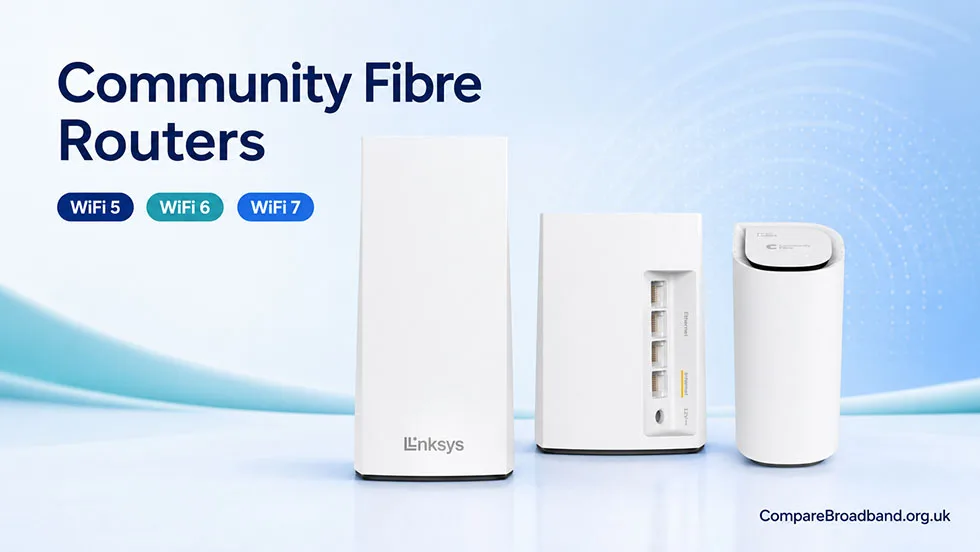
The status light and buttons differ by model. WiFi performance is best when the router remains upright, uncovered and away from cupboards, televisions and other electrical equipment.
The engineer normally chooses a central, open position within reach of the ONT. A Fibre To Your Room service is available when a customer wants the connection installed in a particular room.
Linksys M60 – WiFi 7 router (current)
The Linksys M60 is Community Fibre’s current dual-band WiFi 7 router for packages from 1Gbps through to 2.5Gbps Premium WiFi.
Its main features include:
- WiFi 7 wireless technology
- Dual-band WiFi
- Intelligent mesh connectivity
- Multi-gigabit wired capability
- WPA2 and WPA3 security
- Guest WiFi and parental controls
- Management through the Linksys Now dashboard
WiFi 7 can use wider wireless channels and manage busy home networks more efficiently than WiFi 6. A compatible WiFi 7 phone, laptop or network adapter is required to use the latest features.
Older WiFi 5 and WiFi 6 devices can still connect. The router uses WPA2/WPA3 hybrid security by default to maintain compatibility with older equipment.
Choose a Community Fibre plan with free setup and up to £170 voucher
All plans come with symmetric speeds, free installation, and voucher rewards up to £170
Check deals in your areaLinksys M62 – tri-band router for 5Gbps Premium WiFi
Community Fibre supplies the Linksys M62 with its 5Gbps Premium WiFi package.
It is a tri-band WiFi 7 router, giving it an additional wireless band compared with the dual-band M60. The extra wireless capacity is useful in larger households with many connected devices and several mesh routers.
The M62 is capable of delivering the 5Gbps package speed through a compatible multi-gigabit wired connection. Receiving that speed on one device requires a suitable Ethernet port, network adapter and cable.
WiFi will be slower than the wired connection. Community Fibre’s expected WiFi range for the 5Gbps package is 800–1,050Mbps. The remaining bandwidth can be shared between other connected devices.
Setup
A new customer normally receives the router during the installation appointment. The engineer installs the ONT, connects the router and checks that the broadband service is active.
The process usually includes:
- Connecting the router’s WAN port to the ONT
- Positioning the router for suitable WiFi coverage
- Setting up any Premium WiFi mesh routers
- Checking the wired and wireless connection
- Confirming the WiFi name and password
A typical installation takes approximately 90 minutes, although the time depends on the fibre route and work required inside the home.
Existing customers can receive replacement or additional routers by courier. Instructions depend on the model supplied.
The power button restarts the router. A factory reset uses the separate reset button and removes customised settings, including the WiFi name and password.
Real-world performance and coverage
Package speed and WiFi speed are not the same. Community Fibre’s package speeds refer to a wired Ethernet connection to a compatible router and device.
Expected WiFi speeds include:
| Package | Expected WiFi speed |
|---|---|
| 1Gbps | 500–750Mbps |
| 2.5Gbps with WiFi 7 | 700–950Mbps |
| 5Gbps with WiFi 7 | 800–1,050Mbps |
The 2.5Gbps package offers a fixed-line speed of up to 2.3Gbps with the current WiFi 7 router.
WiFi performance depends on the connected device, distance from the router, wall construction, interference and mesh placement. Older phones and laptops can remain limited by WiFi 5 or WiFi 6 even when connected to a WiFi 7 router.
A multi-gigabit Ethernet connection is required to receive more than 1Gbps on one device. Gigabit Ethernet ports limit an individual wired connection to 1Gbps.
Mesh expansion and Premium WiFi
The M60 and M62 use Linksys intelligent mesh technology. Additional compatible routers can extend the same WiFi network into rooms that receive a poor signal from the main router.
Premium WiFi is available to new customers taking eligible 1Gbps, 2.5Gbps or 5Gbps packages with a 24-month contract.
It includes:
- Professional installation and router positioning
- Additional mesh routers where required
- Priority customer service
- Coverage in up to 12 rooms
- Up to five bedrooms
- A maximum of three floors
- A minimum 50Mbps WiFi guarantee
If Community Fibre cannot deliver at least 50Mbps at the furthest included point after installation, the customer receives three months of free broadband, subject to the guarantee conditions.
Garages, sheds, summer houses and other outbuildings are excluded. Moving a professionally positioned router can also affect eligibility under the guarantee.
Routers supplied with each package
Community Fibre currently assigns its Linksys routers as follows:
- Packages below 100Mbps: Linksys WHW01 dual-band WiFi 5 router
- Packages from 100Mbps to 500Mbps: Linksys MX20 dual-band WiFi 6 router
- Packages from 1Gbps through to 2.5Gbps Premium WiFi: Linksys M60 dual-band WiFi 7 router
- 5Gbps Premium WiFi: Linksys M62 tri-band WiFi 7 router
The model supplied can differ for existing customers and installations outside Community Fibre’s main London network
| Router | Current use | Management |
|---|---|---|
|
Linksys WHW01 WiFi 5 · Dual-band | Packages below 100Mbps | Linksys app and web interface |
|
Linksys MX20 WiFi 6 · Dual-band | 100–500Mbps packages | Linksys app and web interface |
|
Linksys M60 WiFi 7 · Dual-band | 1Gbps to 2.5Gbps Premium WiFi | Linksys Now |
|
Linksys M62 WiFi 7 · Tri-band | 5Gbps Premium WiFi | Linksys Now |
|
Nokia G-2426G-A WiFi 6 · Dual-band | Selected Surrey and Sussex installations | Model-specific controls |
The Nokia G-2426G-A has four gigabit Ethernet ports and two voice ports. Customers in Surrey and Sussex should confirm the router supplied with their particular package before ordering.
App and web control
Community Fibre uses different management systems for its older and current Linksys routers.
WiFi 5 and WiFi 6 routers use the Linksys mobile app. Customers can also enter 192.168.1.1 in a browser while connected to the home network.
These controls allow customers to:
- View connected devices
- Change the WiFi name and password
- Create a guest network
- Pause internet access for selected devices
- Set parental controls
- Split the 2.4GHz and 5GHz bands
- Configure port forwarding
The current WiFi 7 routers do not use the Linksys mobile app. Customers manage them through Linksys Now by entering myrouter.info in a browser.
The phone, tablet or computer must be connected to the router’s local network. Linksys Now cannot be opened remotely through an outside internet connection.
Security and parental controls
The current WiFi 7 routers use WPA2/WPA3 hybrid mode by default. This allows modern equipment to use improved WPA3 security while retaining compatibility with older devices.
Customers with fully compatible devices can change the router to WPA3-only mode. Some older smart-home products cannot connect using WPA3, so WPA2 may still be necessary.
The available controls include:
- Guest WiFi
- Device information
- Internet pausing
- Parental controls
- Online safety settings
- WiFi password changes
- Router speed tests
Guest WiFi keeps visitors and smart-home equipment separate from the main wireless network.
Reliability and troubleshooting
Restarting the router can clear temporary connection problems without removing its settings. Switch it off at the wall, unplug it for two minutes and then reconnect the power.
Before restarting, check that the Ethernet cable between the ONT and router is firmly connected.
A factory reset should be used only when restarting and basic troubleshooting have failed. Pressing the reset button for up to 12 seconds restores the original settings and removes any changes made by the customer.
WiFi dead zones do not always require a replacement router. Better positioning or an additional compatible mesh router can improve coverage. Premium WiFi customers should contact Community Fibre before moving equipment installed under the coverage guarantee.
Other routers used by Community Fibre
Existing customers can have Linksys SPNMX55CF, SPNMX57CF, Velop AC2200 or MX4200 equipment from earlier installations. These WiFi 5 and WiFi 6 routers remain usable but are no longer the main models assigned to new faster packages.
Some multi-gigabit customers have a Technicolor FGA5330 WiFi 6 router. It includes gigabit Ethernet sockets, a 10Gbps LAN port and a 10Gbps SFP connection for the incoming service. This allows a compatible wired device to receive more than 1Gbps.
Community Fibre supplies the Nokia G-2426G-A in selected Surrey and Sussex areas. Its equipment and installation process differ from the Linksys setup used across much of London.
An existing customer moving to a faster package can ask whether a router replacement is required. Receiving a new router depends on the package, existing equipment and installation area.
Homes suited to Community Fibre mesh routers
The M60 is suitable for customers taking 1Gbps or 2.5Gbps broadband who have many connected devices, frequent large downloads and regular cloud uploads.
The M62 is ideal for 5Gbps Premium WiFi customers who need very high total bandwidth across numerous wired and wireless devices. Most individual devices will not receive the complete 5Gbps speed.
Premium WiFi is particularly useful in:
- Larger houses
- Homes with several floors
- Premises with thick internal walls
- Rooms far from the main ONT
- Households experiencing repeated WiFi dead zones
Customers in smaller flats can often obtain suitable coverage from one router without paying for a Premium WiFi package.
Verdict
Community Fibre’s current router range is better than the older WiFi 6 equipment described in its previous package information.
The dual-band Linksys M60 gives 1Gbps and 2.5Gbps customers access to WiFi 7, multi-gigabit wired speeds and intelligent mesh expansion. The tri-band M62 adds more wireless capacity for the 5Gbps Premium WiFi package.
Neither router will deliver the complete 2.5Gbps or 5Gbps speed to one device over WiFi. Customers need compatible multi-gigabit Ethernet equipment for the fastest individual connection.
Premium WiFi adds useful professional installation and a clear minimum-speed guarantee for larger homes. The limit is 50Mbps across the included rooms rather than the complete package speed in every room.
Customers on slower packages receive older WiFi 5 or WiFi 6 equipment, while Surrey and Sussex installations can use a Nokia router. Check the exact model, expected WiFi range and wired ports before choosing a package.